We’ve put together a couple of
helpful resources to make prompting in LogicGlue easier and more effective!
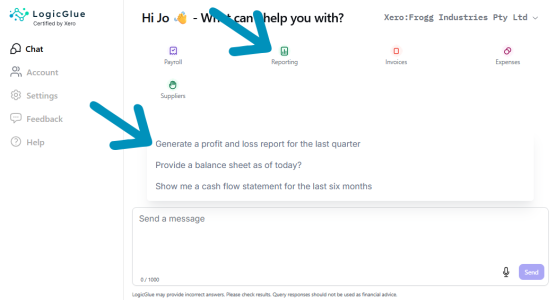
First, when you open the LogicGlue app and land on the Chat screen, you’ll see a set of
suggested prompts. These appear as category icons (Payroll, Reporting, Invoices, etc.).
When you click on a category (eg. Reporting), a menu of suggested prompts will appear above the chat box.
They’re a great way to get started and spark ideas for the kinds of questions you might want to ask.
Second, we have a dedicated
Prompts How-To page:
https://logicglue.com/prompts/
This guide walks you through how to structure your prompts so you get clearer, more accurate answers every time.
If you're looking to get more out of LogicGlue, both of these resources are a great place to begin!


